
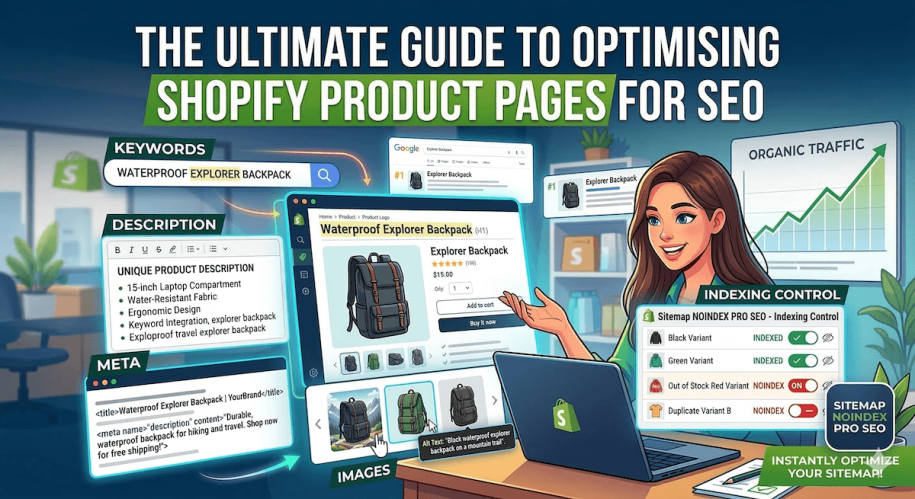
Getting traffic to your Shopify store is great — but traffic landing directly on your product pages is where the real money is made.
When a shopper arrives on a product page from a Google search, they usually have high purchase intent. They aren’t just browsing — they are actively looking for a specific product to buy.
But with millions of Shopify stores competing for attention, how do you make sure your products appear at the top of search results?
In this guide, we’ll show you exactly how to optimise your Shopify product pages to rank higher in Google, drive more organic traffic, and convert visitors into customers.
1. Do Your Keyword Research (Focus on Long-Tail Keywords)
Don’t try to rank for broad terms like “t-shirt” or “coffee beans”. The competition is simply too fierce.
Instead, focus on long-tail keywords — highly specific phrases your ideal customers are actually searching for.
Example
Instead of targeting:
Running shoes
Target:
Women’s waterproof trail running shoes
Where to use your keywords
- Your product URL
- Page Title (H1)
- Meta Title
- Product description
Make sure keywords appear naturally rather than forcing them into the text.
2. Write Unique Product Descriptions
One of the most common Shopify SEO mistakes is copying product descriptions directly from the manufacturer.
If you do this, you’re competing against hundreds of other stores using the exact same text. Google sees this as duplicate content and may struggle to decide which page deserves to rank.
Often, none of them rank well.
The Fix
Write unique, engaging descriptions for every product.
- Focus on benefits rather than just features
- Use bullet points for readability
- Include keywords naturally
This helps both search engines and customers understand your product.
3. Optimise Your Meta Titles and Descriptions
Your meta title and description appear in Google search results. Think of them as your sales pitch in the search results.
If they aren’t compelling, users won’t click — even if your page ranks well.
Meta Title
- Keep under 60 characters
- Include your main keyword
- Include your brand name
Example:
Waterproof Trail Running Shoes | YourBrand
Meta Description
- Keep under 160 characters
- Summarise the product clearly
- Include a call to action
Example:
Shop waterproof trail running shoes designed for comfort and grip. Free shipping on orders over £50.
4. Don’t Forget Image Alt Text
Search engines can’t actually see images — they rely on the alt text attached to them.
Adding descriptive alt text helps Google understand what your images show and can help your products appear in Google Image search, which is a major traffic source for e-commerce stores.
How to Add Alt Text in Shopify
- Open the product in Shopify Admin
- Click on the product image
- Select Add alt text
Example Alt Text
Woman wearing blue waterproof trail running shoes on a muddy path
Avoid stuffing keywords — simply describe the image naturally.
5. Control Your Indexing (The Secret SEO Weapon)
Many merchants assume they should index every product page on their store. In reality, some pages should not appear in Google.
Allowing too many low-value pages to be indexed can waste your crawl budget and dilute your store’s SEO authority.
Product Pages You May Want to Hide from Google
- Out-of-stock or discontinued products
- Wholesale or B2B products
- Seasonal products (for example Christmas bundles during summer)
- Duplicate product variants (colour variations etc.)
How to Fix This Quickly
Instead of manually editing your theme code or managing indexing rules yourself, you can use Sitemap & NoIndex SEO Tools.
The app allows you to:
- Apply a noindex tag to specific products, collections, or pages
- Automatically remove hidden pages from your XML sitemap
- Ensure Google focuses on your most important revenue-generating pages
This gives search engines a clear signal about which pages should rank.
6. Use Internal Links
Internal links help both search engines and customers navigate your store.
Linking between pages improves crawlability and keeps visitors browsing longer.
Examples:
- Link to related products
- Link to collections
- Link to buying guides or blog posts
This strengthens your overall site structure and improves SEO performance.
Final Thoughts
Optimising your Shopify product pages takes some initial effort, but the long-term reward of consistent organic traffic is worth it.
Start by:
- Writing unique product descriptions
- Optimising your meta titles and descriptions
- Improving image alt text
- Cleaning up your indexing strategy
Once Google clearly understands which pages matter most, your store has a much better chance of ranking higher in search results.
Take Control of Your Shopify SEO
Ready to clean up your product indexing and protect your SEO?
Related Posts:
- From Winning Product to Page: How to Align Product Selection With SEO for Shopify
- Top 10 Shopify Apps To Improve SEO and Convert More in 2026
- How to Noindex Pages in Shopify (And Why It’s Crucial for SEO)
- 5 Best Quiz Apps for Shopify in 2026
- Boost Shopify SEO by adding a Sitemap to your Shopify store
- 5 Shopify SEO Mistakes That Kill Your Rankings (And How to Fix Them)