
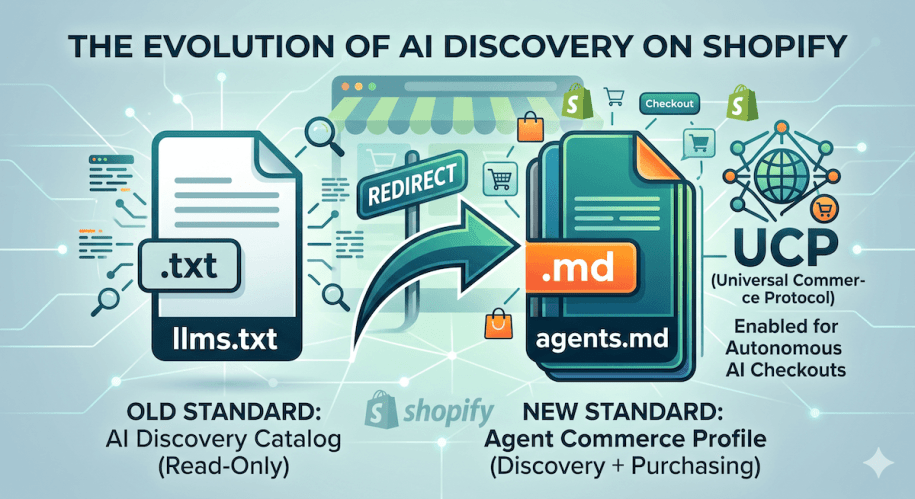
If you’ve been paying attention to the world of AI search and commerce, you know that optimizing your store for AI bots (like ChatGPT, Claude, and Perplexity) is the new frontier of SEO. Until recently, the gold standard for this was the llms.txt file—a simple directory that fed your catalog directly to AI crawlers.
But Shopify just threw a massive, exciting curveball.
If you try to visit a Shopify store’s /llms.txt file today, you will be automatically redirected to a brand-new file: /agents.md.
Shopify isn’t just changing the name of a file. They are standardizing AI discovery across their entire platform around the new Universal Commerce Protocol (UCP). Here is exactly what this means for your store, why it’s a massive upgrade, and how our app is already built to handle it.
What is agents.md and UCP?
Previously, AI bots could read your store, but they couldn’t actually do anything. If a user asked an AI assistant to “buy a black t-shirt,” the AI would have to provide a link and tell the user to go buy it themselves.
The Universal Commerce Protocol (UCP) changes that. UCP is a standardized set of rules that allows AI agents to securely add items to a cart and initiate a checkout via Shop Pay—all without the buyer having to navigate your website manually.
By forcing traffic to agents.md, Shopify is telling AI bots: “Here is exactly how to buy products from this store.”
| Feature | The Old Way (llms.txt) | The New Way (agents.md + UCP) |
|---|---|---|
| Primary Goal | Information & Discovery | Transactions & Purchasing |
| Bot Capability | Read products and prices | Add to cart and trigger checkout |
| Format | Plain text directory | Markdown with API instructions |
| Shopify Status | Redirected | Native Standard |
The Big Problem with Shopify’s Default agents.md
Shopify’s move to UCP is incredible for merchants, but there is one massive gap.
If you look at the default agents.md file Shopify generates for your store, it is purely technical boilerplate. It gives the AI strict instructions on how to use their API endpoints and how to process Shop Pay.
It tells the bot absolutely nothing about your brand, what you sell, or what your priority products are. The AI knows how to use the checkout, but it has zero context on why it should recommend your store to the buyer in the first place. Without a catalog map, the bot is flying blind.
The Solution: The Hybrid AI Sitemap Ecosystem
We immediately updated our app to bridge this gap. We don’t just generate a basic sitemap anymore—we now generate a complete Agent Commerce Profile.
Instead of deleting Shopify’s vital checkout instructions (which would break your store’s ability to accept AI orders), our app securely injects a Hybrid Template directly into your active theme.
When you configure your AI Sitemap using our app, here is what happens:
- Brand Context Injection: We inject your custom Brand Summary right at the top of the
agents.mdfile. The AI immediately learns who you are and what you sell before it even looks at the checkout rules. - The Best of Both Worlds: We automatically link the AI from
agents.mdto a secure, dynamically generatedllms.txtcatalog map powered by our app proxy. - Safe Customization: You get a full Custom Editor to write your own AI product directories, served securely without ever risking accidental damage to Shopify’s native checkout code.
How to Upgrade Your Store Today
If you are already using our app, you don’t need to panic—we’ve got you covered.
- Open the app and navigate to the AI Sitemap dashboard.
- Ensure your Master Switch is enabled.
- Write a brief, keyword-rich Brand Summary to introduce your store to AI bots.
- Click Save Changes.
Our system will instantly generate your new hybrid agents.md file and sync it to your theme. You will give AI bots exactly what they need: your rich brand context (Why to buy) flawlessly merged with Shopify’s UCP instructions (How to buy).
Welcome to the future of AI-driven commerce.
Related Posts:
- Why Your Shopify Store Needs an llms.txt File in 2026 (And How to Get One)
- Top 10 Shopify Apps To Improve SEO and Convert More in 2026
- How to Noindex Pages in Shopify (And Why It’s Crucial for SEO)
- How to Add an llms.txt AI Sitemap to Shopify (Without Code or Cloudflare)
- From Winning Product to Page: How to Align Product Selection With SEO for Shopify
- How To Edit The Robots.txt File On Your Shopify Store